Zapier integration
Track changes to your Zapier automations in CoNote: a Zap paused, failing, newly built, or a broken app connection lands on your timeline.
In plain terms: CoNote keeps an eye on your Zapier setup itself, so when a Zap quietly turns off or starts failing, it shows up on your timeline as a note.
A paused or broken Zap is one of the most common silent reasons the numbers move: leads stop reaching your CRM, orders stop syncing, a form stops posting, and nothing tells you until you go looking. Zapier puts those changes where you'll see them, next to your deploys, campaigns, and config changes.
This tracks changes to your Zaps, not the tools that push through them. If you instead want to pipe an event from another app into CoNote (a Typeform entry, an Intercom change), use the Webhook integration.
What you can track
- A Zap turned on or off: the classic silent cause. Someone pauses a Zap and data stops flowing.
- A Zap started failing: runs are erroring, so the automation is half-broken.
- A new Zap was created or one was deleted: your automation setup changed.
- An app connection needs attention: a login expired, so a connected app stopped working.
CoNote writes a readable title for each ("Zap turned off: Leads → HubSpot") and files it under Configuration or, for failures, Incident.
How it works
Zapier doesn't offer a way for CoNote to read your Zaps directly, so the updates come from Zapier's
own Zapier Manager app: it can trigger a Zap whenever one of your Zaps changes. That Zap ends
with a Webhooks by Zapier → POST step (a webhook is the private link CoNote gives you, so Zapier
can send each change automatically) that posts a small event to your private CoNote URL. The request
carries a shared secret in the x-conote-secret header, an extra field that proves it's from you,
which CoNote verifies.
Setting it up
Add the integration
In Integrations → Browse, choose Zapier. Copy the webhook URL and the secret shown after you connect.
Trigger on a Zapier Manager event
In Zapier, create a Zap and pick Zapier Manager as the trigger app. Choose the event you want to watch, for example Zap Turned On or Off, Zap Errored, or New Zap.
Point it at CoNote
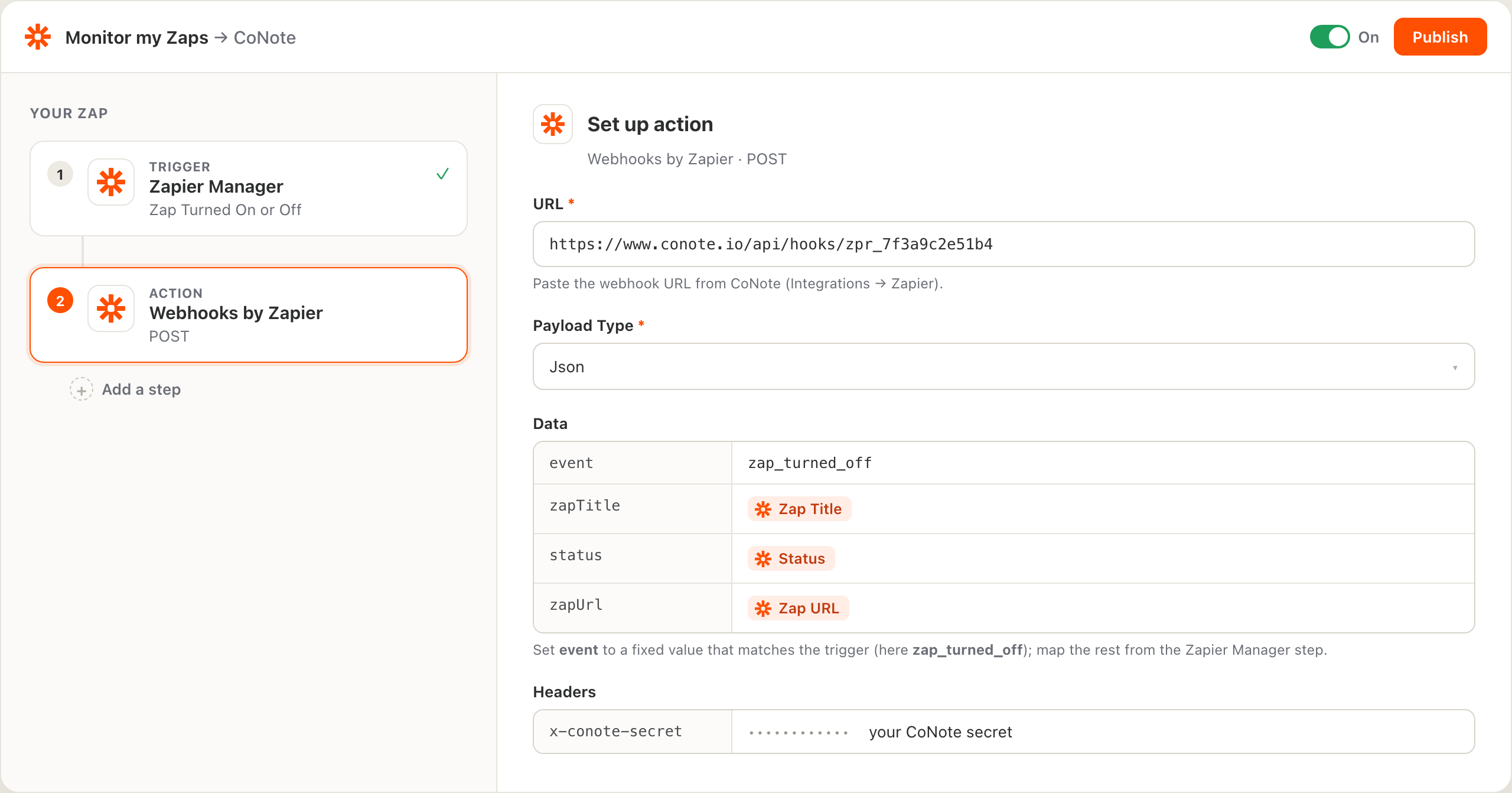
Add an action step, choose Webhooks by Zapier, and pick POST. Set URL to your CoNote URL and, under Headers, add
x-conote-secretwith the secret.Map the fields
Under Data, map the Zapier Manager output into these keys:
event(the change, for a paused Zap set it tozap_turned_off),zapTitle(the Zap's name), and, when the trigger provides them,status,zapUrl, anddetail. CoNote turns those into the note.Turn it on
Publish the Zap. The next time one of your Zaps changes, the note appears on your timeline within seconds. Build one Zap per event you want to watch and point them all at the same CoNote URL.
The Zapier connection is one integration and counts as one seat, the same as any other source. You can send every monitoring Zap to the same CoNote URL, so one seat covers all of them.